
FlowDevs
Constrain the Problem, Not the Intelligence
Effective AI prompting requires constraining the problem, permissions, and success criteria, not the intelligence. Learn how to empower your AI agents.
Aug 1, 2026 · 4 min read
Read more
July 15, 2024 · 1 min read · Justin Trantham
10 useful run commands to make navigating windows a little easier.

Windows Run commands can make navigating around windows systems faster. Here are some of the ones I find myself using on a somewhat regular basis.
To use a run command press Windows Key + R to open Run
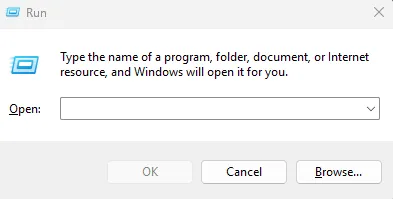
Run
appwiz.cpl - Programs and Features
sysdm.cpl - Opens System properties used to join the domain or change computer name.
cmd - Opens command prompt
powershell - Opens Powershell powershell ise will open powershells IDE
notepad - opens notepad useful for pasting information
regedit - opens registry
msinfo32 - used to see the specs of the computer "System Information"
shutdown /r /f /t 00 - reboot the computer without waiting for any user input or hung applications
devmgmt.msc - Device Manager used for looking at drivers
lusrmgr.msc - local user manager helpful for creating local accounts.
Hopefully your navigation through windows a little easier.
Effective AI prompting requires constraining the problem, permissions, and success criteria, not the intelligence. Learn how to empower your AI agents.
Aug 1, 2026 · 4 min read
Read moreStop copy-pasting standard code snippets. Learn how AI coding agents use system context to automate workflows, fix bugs, and build better software.
Jul 30, 2026 · 5 min read
Read moreA case study on why fixed UI is becoming less important and how runtime-rendered interfaces can revolutionize operational software and business workflows.
Jul 30, 2026 · 7 min read
Read moreWe build the systems described here. A short call is usually enough to tell whether it's worth building.