
FlowDevs
Constrain the Problem, Not the Intelligence
Effective AI prompting requires constraining the problem, permissions, and success criteria, not the intelligence. Learn how to empower your AI agents.
Aug 1, 2026 · 4 min read
Read more
December 18, 2025 · 6 min read · Justin Trantham
In the Python MCP ecosystem, there are three primary strategies for securing MCP servers: Network Isolation (private networking), Key-Based Access, and OAuth-Based Access. Today, we focus on the most common starting point for public-facing servers: Key-Based Authentication.The Case for Key-Based
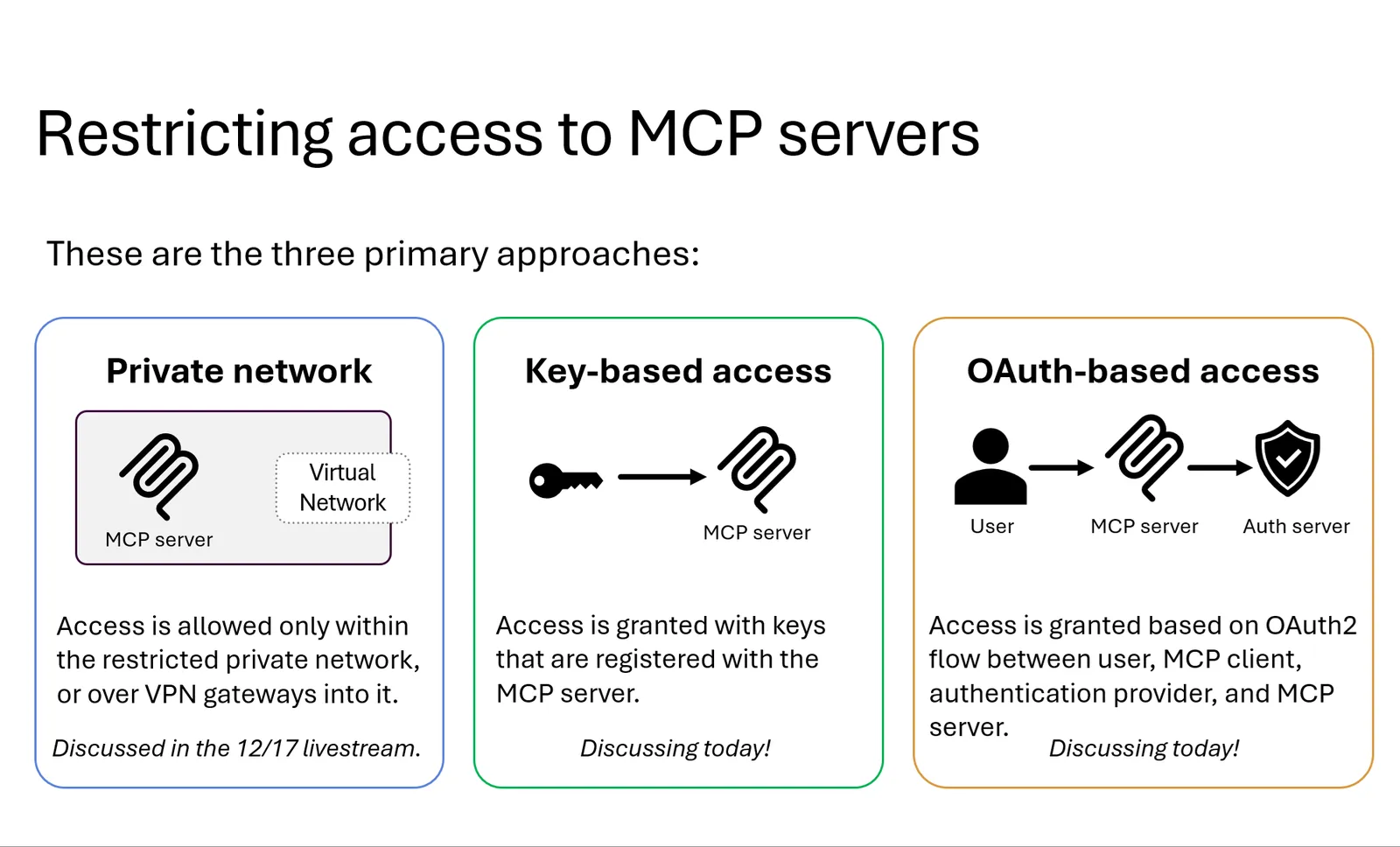
Sildes - here
As we move from building proof-of-concept Model Context Protocol (MCP) servers to deploying production-ready infrastructure, security transitions from an afterthought to a primary requirement. Whether you are exposing tools to GitHub Copilot or custom LangChain agents, you need robust mechanisms to control access.
In the Python MCP ecosystem, there are three primary strategies for securing servers: Network Isolation (private networking), Key-Based Access, and OAuth-Based Access. Today, we focus on the most common starting point for public-facing servers: Key-Based Authentication.
Key-based access is the path of least resistance for developers requiring public connectivity without the overhead of full identity management. In the MCP protocol, this communication occurs over HTTP. The client sends a POST request including a key in the headers, typically formatted as Authorization: Bearer <KEY>.
If you are deploying your MCP server to Azure, you have two strong architectural choices for implementing this:
Azure Functions: Ideal for internal tools and prototyping. Azure Functions offers built-in support for function keys (passed via headers like x-functions-key). It is simple to set up but offers limited lifecycle management.
Azure API Management: The production-grade choice for public-facing APIs. It sits in front of your MCP server, handling key revocation, developer portals, and usage tracking.
To demonstrate this, we looked at Tavily, a search service optimized for LLMs. When configuring a connection to mcp.tavily.com in VS Code, we utilize the editor's built-in secret storage. Instead of hardcoding API keys, VS Code prompts for the key once, saves it securely, and passes it during the handshake.
In our tests, we asked an agent, "What is the latest LLM released by Google?" The client authenticated using the stored key, and the server successfully retrieved live web data, correctly identifying the December 18th release of Gemini 2.0 Flash.
For developers building Python agents, you can configure your frameworks to pass these headers dynamically using environment variables:
While key-based access is sufficient for many use cases, enterprise-grade security requiring user-level identity leads us to the next frontier: OAuth 2.1.
As the MCP ecosystem matures, simple API keys often fall short for enterprise requirements. True user-centric security requires OAuth 2.1, allowing an MCP client (like Claude Desktop or VS Code) to authenticate on behalf of a specific user.
However, MCP introduces a unique challenge: the "Arbitrary Client" problem. Unlike traditional web apps, the authorization server often doesn't know the client ahead of time. This has sparked a shift between two technical standards: Dynamic Client Registration (DCR) and Single Identity Metadata (SIMD).
DCR (RFC 7591) allows a client to "introduce" itself to the auth server.
The Flow: The client requests registration; the server creates a database record and issues a Client ID.
The Downside: It forces the auth server to maintain a stateful database of thousands of ephemeral clients, creating storage burdens and potential DDoS vectors. Many enterprise providers, like Microsoft Entra, avoid this.
SIMD is the emerging standard designed to solve the friction of DCR.
The Flow: Instead of asking for a database entry, the client hosts a signed JSON document about itself at a verifiable HTTPS URL. The client's "ID" is simply this URL.
The Upside: It is stateless, secure by design via DNS/HTTPS, and eliminates database bloat. VS Code already publishes a SIMD document, with others expected to follow.
Regardless of the standard used, the secure MCP request lifecycle looks like this:
Discovery: The client hits the MCP server and receives a 401 Unauthorized.
Metadata Lookup: A WWW-Authenticate header points the client to the Protected Resource Metadata (PRM).
Validation: The client identifies the Authorization Server. If using SIMD, it presents its hosted metadata URL. If using DCR, it attempts to register.
Token Exchange: The user consents, an access token is issued, and the tool executes.
If you are building today with Python and fastmcp, prioritize SIMD for future-proofing, but be prepared to fallback to DCR or use library abstractions like OAuthProvider to handle the negotiation.
Building a secure MCP server on Azure involves choosing the right identity provider (IdP). Your choice between a self-hosted solution like Keycloak or a managed service like Microsoft Entra ID dictates your architectural patterns.
Keycloak is a powerful option for private clouds because it natively supports Dynamic Client Registration (DCR).
The Flow: When VS Code contacts the server, it triggers a 401 challenge, discovers the .well-known configuration, and dynamically registers a new client in Keycloak.
Identity Propagation: In our demo (tracking avocado toast expenses), we used middleware (token_user_auth_middleware) to extract the User ID from the Keycloak token. The resulting record in Cosmos DB was tagged with the specific User ID (e.g., 0159...), proving that user context traveled securely from the client interface to the database.
Caveat: You may need to patch Keycloak's DCR implementation regarding specific header handling in your Python code.
Microsoft Entra is the enterprise standard, but it does not natively support DCR or SIMD. To bridge this gap, we must use an OAuth Proxy pattern.
The Architecture: Using the AzureProvider class in FastMCP, we create a proxy layer. The MCP server simulates the DCR behavior locally while delegating actual user authentication to Entra.
Infrastructure: This approach requires a database (like Cosmos DB) to store the client mappings that Entra ignores.
The User Experience: The user sees a FastMCP consent screen before being redirected to the standard Microsoft login. Despite this extra hop, the system successfully extracts the Object Identifier (OID) from the Entra token, ensuring the database record matches the user's Azure tenant identity perfectly.
For production deployments, avoid manual configuration. Use the Microsoft Graph SDK to automate the creation of Entra app registrations, redirect URIs, and scopes.
Summary: If you control the client (e.g., internal VS Code extensions), you can use pre-registered Client IDs and skip the complexity. However, for a flexible MCP server that supports any arbitrary client, the Proxy pattern is currently the gold standard for Azure integration.
Speaker information - where the credit goes:
Pamela Fox
Effective AI prompting requires constraining the problem, permissions, and success criteria, not the intelligence. Learn how to empower your AI agents.
Aug 1, 2026 · 4 min read
Read moreStop copy-pasting standard code snippets. Learn how AI coding agents use system context to automate workflows, fix bugs, and build better software.
Jul 30, 2026 · 5 min read
Read moreA case study on why fixed UI is becoming less important and how runtime-rendered interfaces can revolutionize operational software and business workflows.
Jul 30, 2026 · 7 min read
Read moreWe build the systems described here. A short call is usually enough to tell whether it's worth building.